Meyer Distributing
Designing clarity into a pricing system no one had thought about before
From a blank slate and a legacy codebase, building the end-to-end UX for an internal pricing tool used daily by operations teams across a national distribution network.
ROLE
Product Designer & Developer
TOOLS
Figma, Github, C#, Razor Pages, SCSS, Bootstrap, JavaScript
TEAM
1 Designer & Developer (me), 3 Engineers
DURATION
Ongoing
OVERVIEW_
Crafting a pricing tool that had never really been designed
Meyer Distributing is a national distributor with a sprawling catalog of products sold across multiple storefronts. Behind the scenes, operations teams set prices manually, navigating a tangle of contribution margins, COGS, competitor data, and store-specific rules every day.
When I joined as the sole designer and developer, no design system existed. No component standards. No established UX patterns. The pricing workflows were functional enough to ship, but not designed, and the gap between what users needed and what they had was significant.
INSIGHTS_
NO DESIGN SYSTEM
Inconsistent components across the platform, no shared tokens or documentation, and two separate surfaces (e-commerce + admin) diverging over time.
SOLO OWNERSHIP
Every decision from workflow discovery through production code was mine. No design reviews, no handoff. Design and implementation happened in parallel.
LEGACY CODEBASE RESTRAINTS
Shipping into an existing frontend required working within established patterns while introducing new systems that could scale forward.
RESTRICTED DATA
Vendor and storefront names, and certain financial calculations, couldn't be surfaced in external materials, shaping how the tool was documented and presented.
CHALLENGE_
Complex pricing logic with no visual layer to support it
The tool surfaced real data: category floors, margin-optimized prices, competitor benchmarks, COGS, fees, and profit calculations across multiple size variants per SKU. But the information architecture made none of this readable at a glance.
Users couldn't quickly see what price was selected, why it was recommended, or how the underlying signals compared. Every decision required significant mental overhead, and the interface offered no support.
SOLUTION_
Three iterations. One through-line: reduce cognitive load.
V0 — Initial wireframes: Structure first, style later
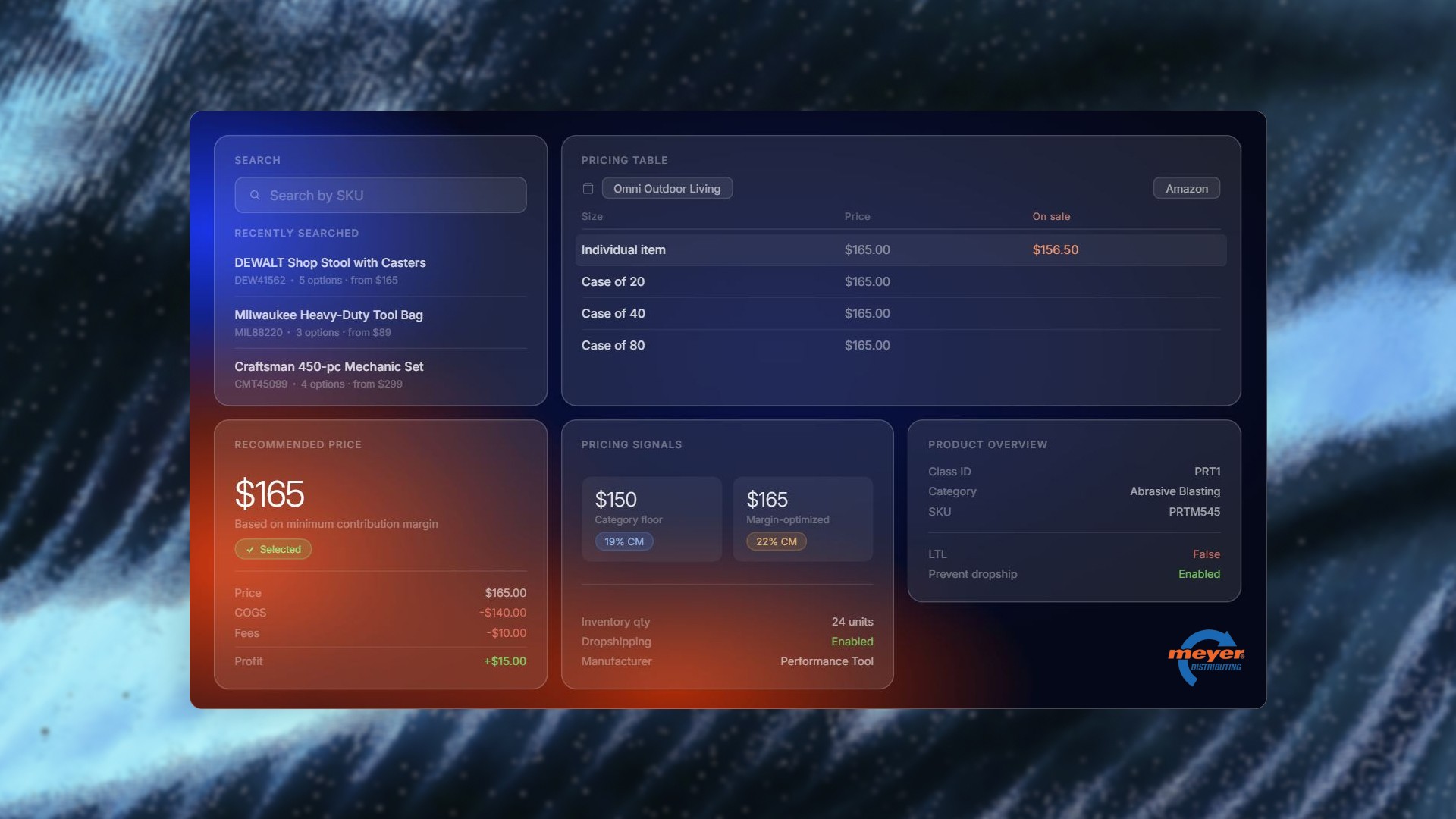
Before any visual design, I mapped the information architecture. What data does a pricing specialist need, in what order, and at what level of detail? The first wireframes were rough and intentionally unstyled, focused entirely on layout logic: search on the left, pricing table top right, signals and overview below.
V1 — Light-mode prototype: Validating the structure with real data
The first fully designed iteration used a clean light-mode treatment to validate the layout with actual content. This version introduced the pricing signal cards, the selected price summary, and the product overview panel. Feedback from this round surfaced issues with information hierarchy and the weight given to each section.
V2 — Something else here
The layout was refined to surface the recommended price and its rationale immediately, with supporting data visible but secondary.
From wireframe to production, three decisions that defined the experience
01 — Make the recommended price impossible to miss
The pricing tool's core job is helping specialists confidently select a price. Rather than presenting all signals equally and making users synthesize them, the recommended price takes primary visual weight with a clear rationale label ("Based on minimum contribution margin") and a selected state that's unambiguous. Everything else is supporting context.
02 — Pricing signals as scannable cards, not a data table
Category floor, margin-optimized price, MAP, and competitor benchmarks each carry a different type of meaning. Putting them in a table buried the conceptual differences. Cards with labeled icons, color-coded contribution margin badges, and a consistent price + breakdown structure let specialists compare signals at a glance without reading line by line.
03 — SKU search as the entry point to everything
Specialists don't browse, they search. The search bar is the first element in the layout, with recently searched SKUs surfaced immediately so returning to a product requires zero friction. The search result shows the key decision inputs (pricing options, price range) before the user even clicks through, reducing the round trips needed to make a decision.
TAKEAWAYS_
Introducing design as a product priority
Beyond the platform itself, a meaningful part of this work was establishing that UX deserved a seat at the table. Biweekly C-suite design reviews were a new structure I introduced, making design decisions visible to leadership and creating a feedback loop that didn't exist before.